



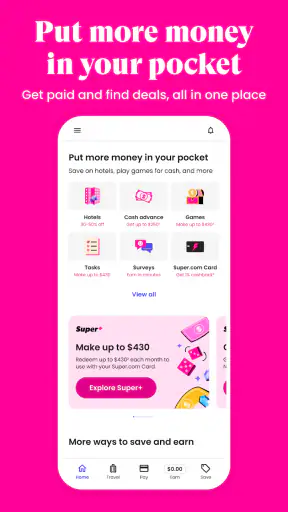
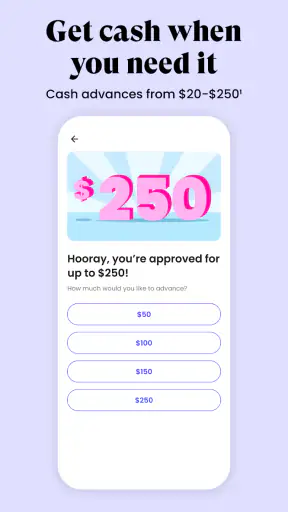
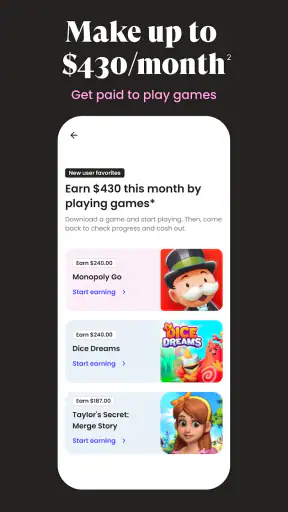

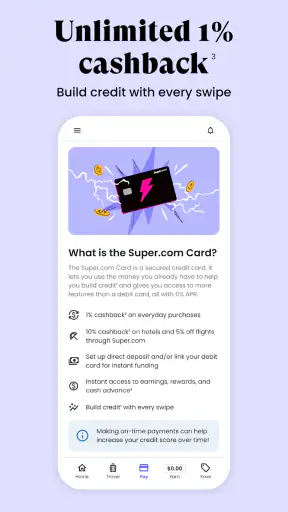
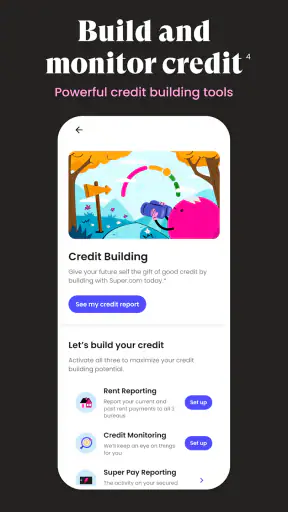

When I first opened Super.com-Cash Advance, Travel, I did not treat it as a single-purpose budgeting tool. It is a finance app built around several money-related activities, including saving, earning, travel, and access to cash-advance services. That broad approach can be useful if you want fewer separate apps, but it also means you need to pay attention to which part of the experience you are using at any given moment.
My overall impression is that Super.com is most useful for people who like to compare ways of stretching their money rather than managing everything through a traditional bank app. It feels designed for practical, short-term decisions: finding a travel option, checking an available money feature, or looking for a way to keep more of a paycheck available. I would not replace a full bank account or a carefully planned budget with it, but I can see why someone would keep it installed alongside those tools.
The app is free to install and is aimed at everyone from an age-rating perspective. It was developed by Super, previously known as SnapTravel, and its finance focus is reflected in the way travel and money services appear together. The current version is 14.10.8, and it requires at least operating system version 10. That makes checking your device compatibility worthwhile before you begin, especially if you are using an older phone.
What to expect when you open Super.com
The first thing to understand is that this is not simply a cash-advance calculator. The name may draw your attention to short-term access to money, yet the wider app experience covers more than that. I found it better to think of Super.com as a central place for several financial choices, with travel included as one of its more distinctive areas.
That combination is convenient, but it can also create a small learning curve. A person opening the app because of travel may not immediately know whether to explore travel savings first or look at the money tools. Likewise, someone interested in a cash advance may be tempted to browse other offers before understanding the conditions attached to the specific service they need.
My advice is to begin with one clear goal. If your goal is to make a trip more affordable, stay inside the travel section until you understand what the app is showing you. If your goal is to handle a short cash gap, focus on the relevant money feature and read each screen carefully instead of treating every option as interchangeable.
The app has a large existing audience, with more than a million installs and an average rating of 4.5 from roughly thirty-one thousand ratings. Those figures suggest that the concept has broad appeal, but they should not replace your own check of the terms and usefulness for your situation. A popular app can still be a poor match for someone who needs predictable banking tools, long-term planning, or complete control from one institution.
Who will get the most from it
I think Super.com suits people who want to explore several ways to reduce everyday financial pressure from one mobile interface. It may appeal to a traveler comparing options, a user trying to manage the days before payday, or someone who prefers a guided financial marketplace over a collection of separate websites.
It is also a reasonable fit for users who are comfortable reading details before accepting an offer. Finance apps often make the first step feel simple, while the important information appears later in the process. I would use Super.com with a note-taking mindset: identify the amount involved, understand the repayment or usage conditions shown to you, and decide whether the convenience is worth it.
On the other hand, I would skip it if you want a conventional banking app with a familiar account ledger, direct control over all your banking products, and no interest in exploring additional services. It is also not the right choice for someone who tends to accept financial offers quickly without checking the full cost or timing.
What makes the combination useful
The unusual part is the overlap between travel and personal finance. A normal travel app generally concentrates on finding and organizing a trip. A normal banking app concentrates on balances, transfers, and account activity. Super.com sits between those habits, so it can support a more practical question: how can I make a particular plan fit my available money?
That does not automatically make it cheaper than every alternative. A dedicated travel service may provide a clearer comparison for a complicated itinerary, while a bank or credit union may be a better place to discuss longer-term borrowing. The advantage here is convenience and range, not a guarantee that every option will be the best one.
Setting up the app without rushing
After installation, I recommend allowing yourself a few quiet minutes for the initial setup rather than opening it while standing in a checkout line or rushing to catch a flight. Finance apps work best when your information is entered deliberately and when you have time to read what each screen is asking you to do.
Start by confirming that you are using the official Super.com application from Super. Since the developer was previously known as SnapTravel, seeing the older name in related references may cause a moment of confusion, but the connection explains why travel remains part of the product’s identity.
Once you are inside, look for the main navigation areas and identify the difference between browsing an option and applying for or activating something. This distinction matters. A page that describes a service is not necessarily the same as a completed request, and a travel result is not necessarily a final booking. I always pause before the last confirmation step.
Keep your personal information consistent with the details you may later use for verification or payment. Small differences in names, addresses, or account information can slow down a financial workflow. I would also avoid beginning setup on a shared device, because finance-related information deserves the same privacy care as a banking session.
Before using a cash-advance feature, decide how you will repay or cover the amount. The most important question is not only whether you can access money today, but whether the resulting obligation fits your next income cycle. A short-term solution can become stressful when it is used to cover a recurring shortage rather than an isolated timing problem.
A practical setup routine
I use a simple three-part routine with apps like this:
I choose the single task I want to complete first, such as reviewing a travel option or examining a cash-related feature.
I read the explanatory text and any final review screen before entering a commitment.
I save or note the important result, including what I selected and when I expect the next financial step to occur.
This routine sounds basic, but it prevents one of the most common mistakes: opening several sections, becoming distracted by attractive possibilities, and losing track of which action was actually completed.
Another useful habit is to compare the app with the alternative you would normally use. For travel, check whether a direct provider or another established travel service gives you a clearer total. For a cash need, compare the app’s presented conditions with the options available through your bank, employer, or a trusted local financial institution. The fastest screen is not always the least expensive route.
Privacy and device habits
Because Super.com handles finance-related activity, I would keep the app updated and protect the phone with a strong screen lock. I would not enter sensitive information while connected to an unfamiliar public network, and I would sign out or lock the device if other people regularly use it.
These are not special tricks for Super.com; they are sensible habits for any app that brings money services into a phone. The app is free, but “free to install” should not be confused with every service inside being cost-free. I treat the installation price and the financial terms of an individual feature as two separate questions.
Reaching the first meaningful success
For a first-time user, success should not mean exploring every screen. It should mean completing one small, understandable task. I would begin by opening the area that matches your immediate need, reviewing the available information, and stopping once you have a result you can explain in your own words.
For example, imagine you have a weekend trip coming up and want to see whether the travel side can help you keep the plan within your budget. I would enter the travel section, check the available choices, and write down the full amount shown before making any decision. Then I would compare that amount with the price from a familiar alternative, including any practical extras that matter to you. If Super.com gives you a convenient option that fits your limit, that is a meaningful first win even if you do not use every other feature.
A different everyday scenario is a temporary cash shortage between regular paydays. In that situation, I would open the cash-advance area, check whether the service is available to me, and read the repayment information before continuing. I would calculate whether the next paycheck can cover the obligation alongside rent, food, transport, and existing bills. If the numbers are uncomfortable, the correct successful action may be closing the screen rather than accepting the advance.
That is one of the app’s most important lessons: a useful financial app should help you make a clear decision, not pressure you into using every service it presents. I value the ability to investigate an option and walk away when it does not fit.
How to make the first result useful later
After completing a travel search or reviewing a money feature, take a moment to record the practical conclusion. Did the option fit your budget? Did you understand when money would move? Did the process leave you with a question? Writing down those answers makes the next visit faster and reduces the chance of relying on memory.
I also recommend avoiding simultaneous experiments. Do not start with a travel search, a savings feature, and a cash-advance request all at once. The app’s broad design is helpful when you use it as a menu, but confusing when you treat every item as part of one transaction.
A less obvious advantage of this approach is that it turns Super.com into a comparison checkpoint. You can use it to discover a possible route or financial solution, then verify the decision elsewhere before committing. That is especially valuable for travel, where the headline amount may not answer every question about timing, flexibility, or what is included.
Common points of confusion
The first likely confusion is the relationship between the app’s travel identity and its broader financial purpose. The previous SnapTravel name may lead some users to expect a travel-only product. In practice, the current Super.com experience is wider, so do not assume that every screen is about booking a trip or that every financial tool works like a bank account.
The second issue is the difference between availability and suitability. Seeing a feature in the app does not mean it is automatically the right choice for your circumstances. Eligibility, timing, and the terms presented during the process matter more than the presence of a button on the home screen.
The third is the difference between an advertised amount and the total financial effect. With any advance or borrowing-related service, I look beyond the amount that may become available. I want to understand what I will owe, when I will owe it, and how that fits with other commitments. If the app presents those details in later steps, I do not continue until I have read them.
Travel can create a similar misunderstanding. A displayed travel price may help you compare options, but I would still inspect the details before treating it as the final cost of the whole trip. Dates, changes, cancellations, and extra arrangements can affect the real budget, so the app should be one part of your planning rather than the only source you trust.
Where the experience may feel less comfortable
The all-in-one design can feel busy if you arrived for one narrow purpose. A dedicated travel app may be easier when you already know exactly what you want to book. A standard budgeting app may be better when your main task is tracking spending categories over time. A bank app may be preferable when you need a direct view of accounts and transactions rather than a selection of financial services.
I also think the app requires more self-control than a simple utility. Its usefulness depends on your ability to separate “interesting” from “necessary.” If browsing money features makes you more likely to take on an obligation you did not plan for, a more limited app may be healthier for your routine.
Another trade-off is that convenience can reduce comparison effort. Having travel and money tools in one place saves time, but it can also make the first option feel like the natural option. I deliberately compare before accepting, particularly when the decision affects future income rather than only today’s spending.
Choosing the right next step
Once you have completed your first task, I would not immediately activate every available service. Instead, decide which part of Super.com genuinely belongs in your routine. You may keep it mainly for travel research, use it occasionally when a short cash gap appears, or explore its saving and earning functions at your own pace.
If you are considering a cash advance, make the next step a repayment check. Put the expected obligation beside your upcoming essential expenses. If the plan only works when nothing unexpected happens, I would treat that as a warning. A cash advance can address timing, but it cannot solve a budget that is consistently short.
If travel is your main reason for installing the app, make the next step a side-by-side comparison. Check the same plan through a familiar alternative and compare the total, not just the first number you see. Super.com may be more convenient, while another service may offer a clearer booking process or better match your preferences.
If you are interested in saving or earning features, begin with observation. Learn how the relevant section works, what action is required from you, and whether the result fits your existing financial habits. I prefer a gradual approach because it keeps a broad app from becoming a collection of half-understood commitments.
The app’s age rating of Everyone makes it broadly accessible, but accessibility is not the same as financial suitability. Younger users and anyone new to money services should involve a trusted adult or financially experienced person before accepting an obligation. A calm second opinion is often more valuable than completing a process quickly.
My recommendation after using it
I recommend Super.com to readers who want a flexible finance app that brings travel and several money-focused possibilities into one place. Its strongest quality is the chance to move from a practical goal to a relevant option without jumping between unrelated services. I especially like it as a research and decision tool, provided I keep control of the final choice.
I would not recommend using it as a substitute for a bank, a detailed budgeting system, or professional financial guidance. The broad selection is helpful, but it asks you to read carefully and compare intelligently. For someone who wants a simple account dashboard, the extra range may feel unnecessary. For someone facing repeated cash shortages, an advance feature should be viewed as a temporary bridge, not a plan.
With around seven thousand reviews alongside its larger rating base, the app has generated substantial user feedback, and its 4.5 average gives it a reassuring starting point. Still, my own recommendation is conditional: install it if you have a specific task and are willing to check the details behind each option.
My practical verdict is to use Super.com as a careful financial companion, not as an automatic answer to every money problem. Start with one goal, complete one clearly understood action, compare important choices with the usual alternatives, and only then decide whether the wider app deserves a regular place on your phone.


